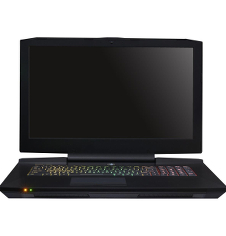
CLEVO P870TM1/ SAGER NP9877 / ORIGIN PC EON17-SLX
UpgradeDriversFAQs

17.3-inch; 60Hz or 120Hz FHD (2K) 1920x1080); 120Hz QHD (3K) 2560x1440; 60Hz UltraHD (4K) 3840x2160

CLEVO P870TM1 / Sager NP9877 (Nov 2017)
G-Sync fully Supported

  • Graphics: Upgradeable MXM 3.1; Desktop GPU - supports both GTX 10x0 series and RTX 20x0 series GPUs
  • Processor: socketed desktop LGA1151 CPU, 8cores/16threads, up to Intel i9 9900K
  • AC Adapter: 330W standard for Desktop GPUs - 330 Watt x 2 (660 Watt)availble; 780 Watt AC availalble
  • VGA Heatsink: dual GPU heatsinks VGA Primary and VGA secondary heatsinks
  • O/S Supported: Windows 10
  • BIOS Required:

  • How do I remove the Keyboard on my CLEVO P870xx
    Feb 20, 2025
    PDF Document

    The attached document will show you how to remove the Keyboard on the P870xx.

    The Document is for removing the Secondary RAM but the RAM is located under the keyboard so it shows how to remove the Keyboard.

    Who do I contact to get some help with my Clevo/Sager Notebook upgrades?
    Jun 15, 2015

    If you have any questions or would like some assistance with your upgrade, please fill in this Support Request Form and our Support team would be happy to assist you!

    Support Request Form